Carrier Reliability

You can add an estimated number of days that a carrier is typically late for a specific carrier and string depending on the carrier week.
1 From the Home page, click the Manage Allocations menu in the right-hand corner of the page, then click Carrier Reliability.
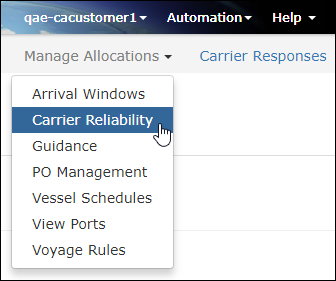
Figure 1: Manage Allocations - Carrier Reliability
2 The Carrier Reliability page will appear. Click Add New to create a new rule for a specific carrier and string for the estimated number of days they are typically late.
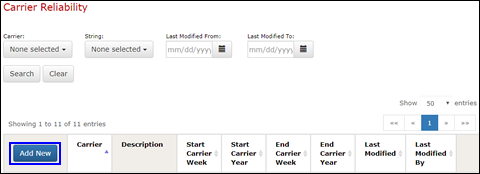
Figure 2: Add New Carrier Reliability Rule
3 The Carrier Reliability pop-up window will appear. Select the Carrier and Strings from the drop-down lists and enter the Days Late. Enter a Start Carrier Week and End Carrier Week for the rule to take effect.
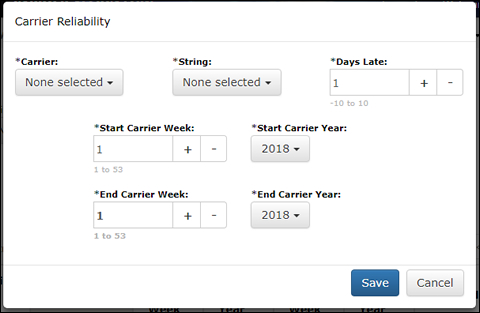
Figure 3: Carrier Reliability
3 Click Save to add the rule.


© 2021 Property of Expeditors International of Washington, Inc. and its subsidiaries.
Business Confidential and Proprietary. Reproduction by written authorization only.
- Created by: Expeditors Technical Communications Department -